

Digital Art Lesson 2: Checking Art
An ongoing series seeking to answer the most common distributor and end-client questions.


Welcome back to Digital Art 101!
Last time, we discussed the difference between Vector and Raster.
Today, we will go over how to check the art and identify the art you have.
**Please note, while I will try to use broad industry terms, this lesson will be based primarily on Adobe products.**
Review Art: Desktop PDF Program
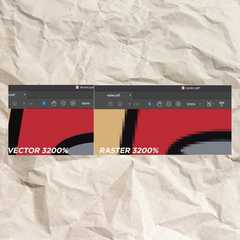
When reviewing art. There are a number of ways to tell what type of file you are looking at, but the easiest way without vector programs is to zoom in over 2000%. This can be done easily with any DESKTOP PDF program.

Here I have two similar artworks, one is a vector, and one is a raster. Zoom in close and you can see what these arts are made of. The vector art is completely crisp and clean. While the Raster version you can see its building blocks called pixels. This method doesn’t guarantee that the file is the quality you need, however, it will let you know if you have to go back to your customer/designer to get the proper file type for your promotional product order.
Review Art: Graphic Programs

CAUTION: Always open your files in Illustrator first!
Vector-based files opened in Adobe Photoshop will convert to Raster, and lose its vector format and quality.
However, opening raster art in Adobe Illustrator will not cause any harm.
For those with design or graphics program experience, opening up in a vector program is another easy way to check what you have.
With the artwork opened in Adobe Illustrator, go to the menu, select view, and then outline.

With the view set to outlines, a good vector will show as a white shape with black outlines.

However, if when you switch to OUTLINE MODE your art turns to a box,
that means you have a raster image and should open it in a raster-based program, like Photoshop.

Now that you can identify what type of art file you have, we can find out how to review the art for production.

 Up next
Is My Art Good Quality?
Digital Art Lesson 3 · July 3, 2023
Read it
Up next
Is My Art Good Quality?
Digital Art Lesson 3 · July 3, 2023
Read it
More from the blog
See all posts →
 Product Showcases
Product Showcase: Veterans Day Promotional Products 2026
Seven Veterans Day promotional products your clients can use to thank those who served, from USA-made buttons and stickers to camo can coolers and whiskey tasters. Includes ideas, imprint tips and FAQs.
Read the article
Product Showcases
Product Showcase: Veterans Day Promotional Products 2026
Seven Veterans Day promotional products your clients can use to thank those who served, from USA-made buttons and stickers to camo can coolers and whiskey tasters. Includes ideas, imprint tips and FAQs.
Read the article

 Product Showcases
Product Showcase: Last-Minute Halloween Promotional Products
Halloween is just over two weeks away. These quick-turn picks give your clients something for costume parties, trick-or-treat nights, fall festivals and haunted attractions, from glow wristbands to custom buttons and stickers.
Read the article
Product Showcases
Product Showcase: Last-Minute Halloween Promotional Products
Halloween is just over two weeks away. These quick-turn picks give your clients something for costume parties, trick-or-treat nights, fall festivals and haunted attractions, from glow wristbands to custom buttons and stickers.
Read the article

 New Products
NEW! Plush Promos from IDProductsource
There’s something universally comforting about a great plush—and now it’s stepping into the spotlight as a powerful (and genuinely lovable) promotional tool.
Read the article
New Products
NEW! Plush Promos from IDProductsource
There’s something universally comforting about a great plush—and now it’s stepping into the spotlight as a powerful (and genuinely lovable) promotional tool.
Read the article
Want something like this for a client?
Send us the details and our team will put a quote together fast.